


Resaltando la belleza de la madera: secado de chapa con control de humedad
La Punto de Rocío y Temperatura DMP5 Vaisala DRYCAP® está diseñada para la medición de humedad en línea en aplicaciones de secado industrial con…
Nota técnica
The ability to calculate lethality is a useful feature in the MadgeTech 4 software. MadgeTech 4 contains formulas that allow the user to automatically calculate A0, F0, Fd, Fh, and Pasteurization Units (PU), using either Math Channels or Statistics Reports. Instructions for adding lethality statistics to reports can be found in the following article: Calculating Lethality in MadgeTech 4 | MadgeTech
While Math Channels and Statistics Reports will use the same mathematical formulas to calculate lethality, there is an important distinction in the behavior of the two methods that users should be aware of when analyzing lethality results. Math Channels will automatically detect new lethality cycles when calculating lethality values, while lethality statistics added to a Statistics Report will not.
Math ChannelsLethality values begin to increase from 0 once the temperature recorded by the selected logger channel rises above Tmin. This begins the first lethality cycle. The lethality value will continue to increase while the recorded temperature remains above Tmin (the rate at which it increases will be determined by the values entered for the additional lethality variables). When the recorded temperature for a cycle drops below Tmin, the lethality value will remain at the maximum value detected for the cycle, until the logger is stopped, or a new cycle is detected.
Subsequent lethality cycles will be detected when the recorded temperature has fallen below, and then rises back above, the Tmin value. When this occurs, the lethality value will reset to 0, and a new cycle begins. This process will repeat, with the F0 value resetting to 0 each time the recorded temperature falls below, and then rises back above Tmin, for the duration of the dataset.
The table below shows example data from a dataset containing multiple lethality cycles, as detected by a Math Channel in MadgeTech 4. The example uses the F0 lethality calculation with a Tmin value of 100 °C. Please note that the temperature readings are taken from an example dataset and are not meant to reflect a realistic lethality cycle.
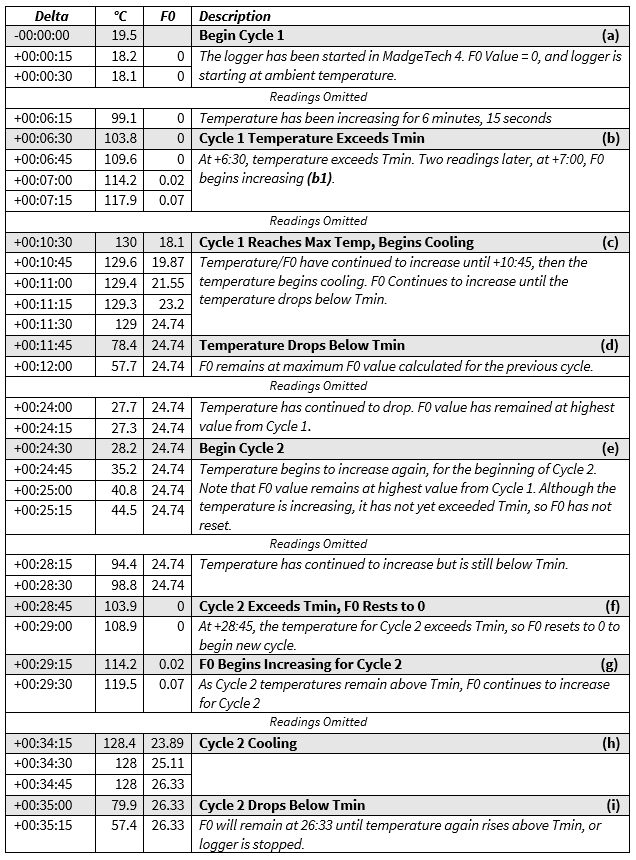
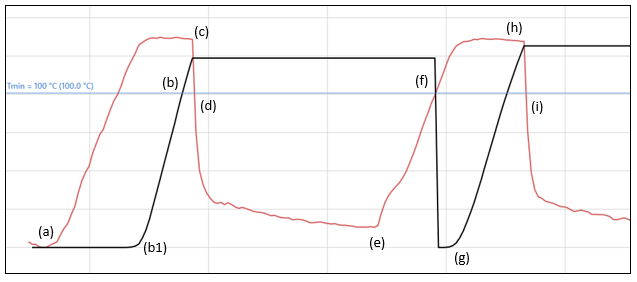
The screenshot below shows a graph of the data in the table above. Note that the letters (a) through (i) in the graph roughly illustrate when the corresponding entry from the table occurs.
Statistics Channel
Lethality values calculated in Statistics Reports do not use automatic cycle detection. If multiple cycles are recorded in a single dataset, the lethality value in a Statistics Report will never reset to 0. The report will instead display the cumulative total for the lethality value from all cycles.
Below is a partial screenshot of a Statistics Report generated from the same dataset used in the example for Math Channels. Note that the F0 value in the statistics report is equal to the sum of the highest values from each cycle in the example above: 24.74 + 26.33 = 51.07.

La Punto de Rocío y Temperatura DMP5 Vaisala DRYCAP® está diseñada para la medición de humedad en línea en aplicaciones de secado industrial con…

El Dr. Lauri Reuter es una experta en el futuro de los alimentos y la persona a quien preguntar si alguna vez te has preguntado qué vamos a comer en…

Las empresas industriales continúan tomando medidas para minimizar sus emisiones de carbono. Muchos están reduciendo el uso de combustibles fósiles y…

En el proceso de caustificación, los químicos pasivos se convierten en químicos de cocina activos para producir licor blanco. Se utiliza en el…
Un especialista responde con la solución, el instrumento y el servicio que corresponden.
Productos para cotizar
Todavía no hay productos. Se puede escribir igual: un especialista responde.