


Bringing out the beauty of wood: Veneer drying with humidity control
Vaisala DRYCAP® Dew Point and Temperature Probe DMP5 is designed for in-line humidity measurement in industrial drying applications with high…
Technical note
The ability to calculate lethality is a useful feature in the MadgeTech 4 software. MadgeTech 4 contains formulas that allow the user to automatically calculate A0, F0, Fd, Fh, and Pasteurization Units (PU), using either Math Channels or Statistics Reports. Instructions for adding lethality statistics to reports can be found in the following article: Calculating Lethality in MadgeTech 4 | MadgeTech
While Math Channels and Statistics Reports will use the same mathematical formulas to calculate lethality, there is an important distinction in the behavior of the two methods that users should be aware of when analyzing lethality results. Math Channels will automatically detect new lethality cycles when calculating lethality values, while lethality statistics added to a Statistics Report will not.
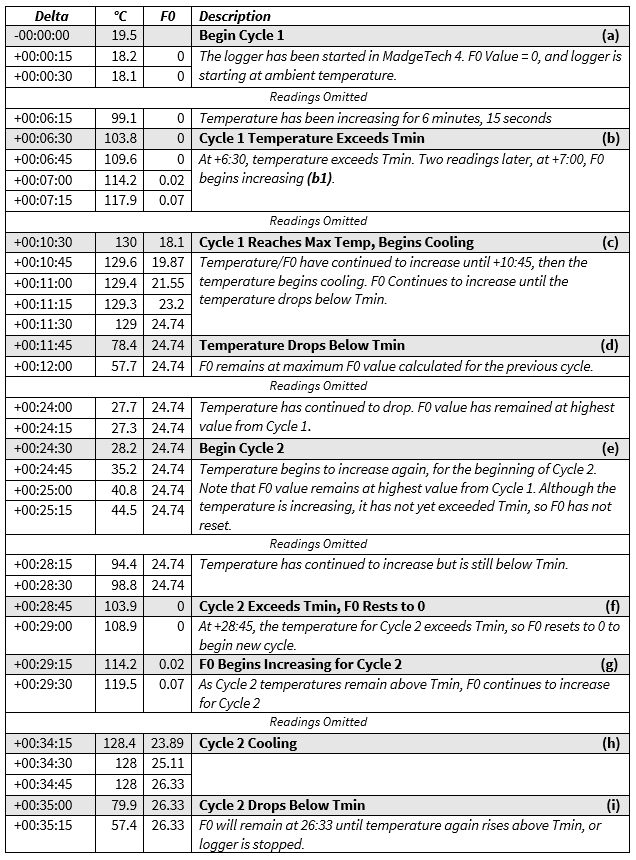
Math ChannelsLethality values begin to increase from 0 once the temperature recorded by the selected logger channel rises above Tmin. This begins the first lethality cycle. The lethality value will continue to increase while the recorded temperature remains above Tmin (the rate at which it increases will be determined by the values entered for the additional lethality variables). When the recorded temperature for a cycle drops below Tmin, the lethality value will remain at the maximum value detected for the cycle, until the logger is stopped, or a new cycle is detected.
Subsequent lethality cycles will be detected when the recorded temperature has fallen below, and then rises back above, the Tmin value. When this occurs, the lethality value will reset to 0, and a new cycle begins. This process will repeat, with the F0 value resetting to 0 each time the recorded temperature falls below, and then rises back above Tmin, for the duration of the dataset.
The table below shows example data from a dataset containing multiple lethality cycles, as detected by a Math Channel in MadgeTech 4. The example uses the F0 lethality calculation with a Tmin value of 100 °C. Please note that the temperature readings are taken from an example dataset and are not meant to reflect a realistic lethality cycle.
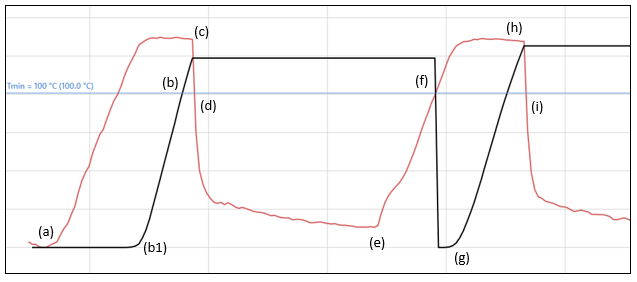
The screenshot below shows a graph of the data in the table above. Note that the letters (a) through (i) in the graph roughly illustrate when the corresponding entry from the table occurs.
Statistics Channel
Lethality values calculated in Statistics Reports do not use automatic cycle detection. If multiple cycles are recorded in a single dataset, the lethality value in a Statistics Report will never reset to 0. The report will instead display the cumulative total for the lethality value from all cycles.
Below is a partial screenshot of a Statistics Report generated from the same dataset used in the example for Math Channels. Note that the F0 value in the statistics report is equal to the sum of the highest values from each cycle in the example above: 24.74 + 26.33 = 51.07.

Vaisala DRYCAP® Dew Point and Temperature Probe DMP5 is designed for in-line humidity measurement in industrial drying applications with high…

Dr. Lauri Reuter is an expert in the future of food, and the person to ask if you’ve ever wondered what we are going to eat in the future, and how…

Industrial companies are continuing to take action to minimize their carbon emissions. Many are reducing their use of fossil fuels and switching to…

In the causticizing process, passive chemicals are converted into active cooking chemicals to make white liquor. This is used in the digester as a…
A specialist replies with the solution, the instrument and the service that fit.
Products to quote
No products yet. An enquiry can be sent anyway: a specialist answers.